Too Many Steps
Routine tasks may require multiple actions across different applications.

A.L.E.A
One intelligent assistant. Connected business workflows.
A.L.E.A helps people get things done through natural conversation.
Instead of navigating multiple applications and manually coordinating every step, users can describe what they want to accomplish. A.L.E.A helps understand the request, coordinate available capabilities, and guide the task toward a meaningful result.
The business challenge
Many everyday activities still depend on several applications, repeated searches, and a sequence of manual steps. People look up information, check operational details, prepare a summary, move work between systems, and follow up on what is still open.
Before the work can start, someone often has to decide which application to open, which information to retrieve, and which step should come next. That coordination adds complexity to work that should feel straightforward.
Routine tasks may require multiple actions across different applications.
Information and activities may be spread across different business systems.
Users may need to manage the sequence of actions themselves.
Users need a clear understanding of what was completed and what still requires attention.
A.L.E.A offers a goal-oriented conversational experience, so people can describe the outcome they want instead of managing every application step themselves.
The A.L.E.A framework
A.L.E.A follows a goal-oriented approach that helps translate natural-language requests into coordinated actions across connected applications. The path below is the business process a user experiences. What can actually be carried out depends on the connected applications, permissions, and workflows that have been implemented.
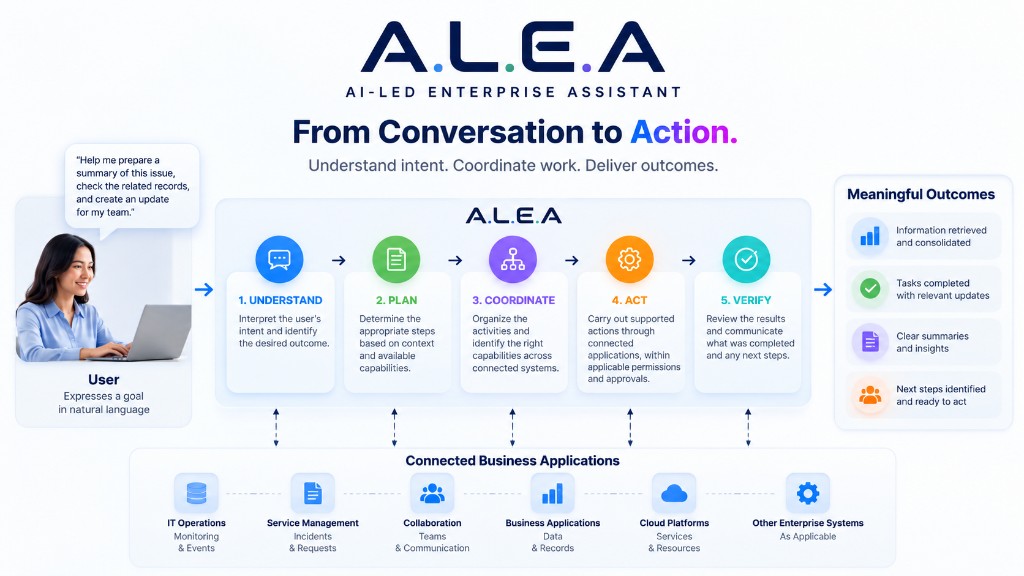
Understand
A.L.E.A interprets what the user wants to accomplish and identifies the intended outcome.
Plan
A.L.E.A determines the appropriate steps based on the request, available capabilities, and relevant context.
Coordinate
A.L.E.A organizes the necessary activities and identifies which connected capabilities can help complete them.
Act
Available actions are carried out through connected applications, subject to permissions and applicable approval requirements.
Verify & Respond
A.L.E.A reviews the available results and communicates what was completed, what was found, and whether further action is required.
How A.L.E.A is different
A conventional conversational assistant responds to a question and leaves the remaining work with the user. A.L.E.A is an enterprise AI assistant built around the goal: understand the intended outcome, help plan the steps, and coordinate supported work across connected applications.
Answers the question.
Helps accomplish the goal.
Supported actions depend on the connected applications, available permissions, and implemented capabilities. A.L.E.A does not automatically complete every task, and human review or approval still applies where the business requires it.
Key capabilities
Users describe their goals in everyday language instead of needing to know every application's commands or workflow.
A.L.E.A works to identify the intended outcome behind the user's request.
A.L.E.A helps determine an appropriate sequence of steps for supported tasks.
A.L.E.A can coordinate supported activities across connected applications, depending on available integrations.
A.L.E.A can communicate task progress and available results so users understand what has happened.
Actions must operate within the applicable permissions, business rules, and approval requirements.
Practical business use cases
These examples show how A.L.E.A could help people complete work. They are illustrative. Each one applies only where the relevant applications, permissions, and workflows have been implemented. They are not a claim that every scenario is already available.
Illustrative example
Illustrative example
Illustrative example
Illustrative example
Illustrative example. Future applications depend on the workflow that is implemented.
Illustrative example
Illustrative user journey
This is a conceptual example of how a request could move through A.L.E.A. It is not a record of a specific production task, and it does not mean A.L.E.A can investigate every issue or access every system.
“Help me investigate this issue, gather the relevant information, and prepare a summary of the findings.”
A.L.E.A identifies the user's objective.
A.L.E.A determines the information and activities required.
A.L.E.A uses the relevant capabilities available to it.
A.L.E.A reviews the information returned by the connected applications.
A.L.E.A presents a summary of the findings and indicates any remaining actions.
Example outcome
Investigation summary prepared. The available information has been consolidated, key findings are highlighted, and recommended next steps are presented.
Illustrative only. Unsupported actions are not shown as completed. Results are limited to information the connected applications actually return.
Responsible and controlled action
Enterprise work has to stay inside the rules of the business. A.L.E.A is designed so supported actions remain permission-aware, reviewable, and clear to the person who asked for them.
Actions should respect the user's applicable permissions.
Tasks should follow the relevant business rules and approval requirements.
Available results should be reviewed before reporting completion.
Users should receive a clear explanation of what happened, what remains incomplete, and where additional input is needed.
How IZZTECH DIGITAL can help
IZZTECH DIGITAL can help organizations explore and implement goal-oriented AI assistance around the work people already do, the applications they use, and the controls the business needs.
Identify repetitive tasks, cross-application activities, and opportunities for intelligent assistance.
Define the user goals, expected outcomes, and appropriate boundaries for AI-assisted workflows.
Connect relevant business applications according to the organization's requirements and available integration options.
Design appropriate permission controls, approval processes, testing, and result verification.
The opportunity is not simply to add AI to an application. It is to help people accomplish meaningful work with less manual coordination.
Business benefits
Allow users to express goals naturally rather than learning every individual application workflow.
Help coordinate supported activities across connected applications.
Provide users with a clear view of available results and remaining actions.
Create opportunities to extend AI-assisted task coordination as business requirements and integrations evolve.
Why IZZTECH DIGITAL
IZZTECH DIGITAL focuses on applying AI to practical business problems. A.L.E.A is that approach applied to everyday work: an AI-Led Enterprise Assistant that helps people move from a natural-language request toward coordinated tasks and useful results.
Let's explore how an AI-Led Enterprise Assistant can help simplify your workflows, coordinate supported tasks, and turn everyday requests into meaningful outcomes.